
Active Directory Management Script (Advanced)
Overview
Section titled “Overview”This is the extended version of the basic AD admin script. Same menu-driven structure, but covers 10 operations instead of 3 — including deleting accounts and groups, managing group membership, resetting passwords, and toggling account states.
Operations
Section titled “Operations”- Create User
- Create Group
- Add Server Role
- Delete User
- Delete Group
- Add User to Group
- List Users in Group
- Reset User Password
- Disable User
- Enable User
Script
Section titled “Script”Each operation is a separate function. The main loop runs until the user picks 11 (Exit).
# Advanced Active Directory Management Suite
Clear-Host
function Create-User {    param(        [string]$Username,        [string]$Password    )    $SecurePassword = ConvertTo-SecureString $Password -AsPlainText -Force    New-ADUser -Name $Username -AccountPassword $SecurePassword -Enabled $true    Write-Host "User '$Username' created successfully." -ForegroundColor Green}
function Create-Group {    param(        [string]$GroupName    )    New-ADGroup -Name $GroupName -GroupScope Global -GroupCategory Security    Write-Host "Group '$GroupName' created successfully." -ForegroundColor Green}
function Add-ServerRole {    param(        [string]$Role    )    Install-WindowsFeature -Name $Role -IncludeManagementTools    Write-Host "Server role '$Role' installed successfully." -ForegroundColor Green}
function Delete-User {    param(        [string]$Username    )    Remove-ADUser -Identity $Username -Confirm:$false    Write-Host "User '$Username' deleted successfully." -ForegroundColor Green}
function Delete-Group {    param(        [string]$GroupName    )    Remove-ADGroup -Identity $GroupName -Confirm:$false    Write-Host "Group '$GroupName' deleted successfully." -ForegroundColor Green}
function Add-UserToGroup {    param(        [string]$Username,        [string]$GroupName    )    Add-ADGroupMember -Identity $GroupName -Members $Username    Write-Host "User '$Username' added to group '$GroupName'." -ForegroundColor Green}
function List-UsersInGroup {    param(        [string]$GroupName    )    $members = Get-ADGroupMember -Identity $GroupName -Recursive | Where-Object { $_.objectClass -eq 'user' }    Write-Host "`nUsers in group '$GroupName':" -ForegroundColor Cyan    $members | ForEach-Object { Write-Host " - $($_.Name)" -ForegroundColor Yellow }}
function Reset-UserPassword {    param(        [string]$Username,        [string]$NewPassword    )    $SecurePassword = ConvertTo-SecureString $NewPassword -AsPlainText -Force    Set-ADAccountPassword -Identity $Username -Reset -NewPassword $SecurePassword    Write-Host "Password for user '$Username' has been reset successfully." -ForegroundColor Green}
function Disable-User {    param(        [string]$Username    )    Disable-ADAccount -Identity $Username    Write-Host "User '$Username' has been disabled." -ForegroundColor Yellow}
function Enable-User {    param(        [string]$Username    )    Enable-ADAccount -Identity $Username    Write-Host "User '$Username' has been enabled." -ForegroundColor Green}
# Main Menu Control Flowdo {    Write-Host "`n==========================================" -ForegroundColor Cyan    Write-Host "    Active Directory Management Suite"    Write-Host "==========================================" -ForegroundColor Cyan    Write-Host "1. Create a User"    Write-Host "2. Create a Group"    Write-Host "3. Add Server Role"    Write-Host "4. Delete a User"    Write-Host "5. Delete a Group"    Write-Host "6. Add User to Group"    Write-Host "7. List Users in a Group"    Write-Host "8. Reset User Password"    Write-Host "9. Disable User"    Write-Host "10. Enable User"    Write-Host "11. Exit"    Write-Host "------------------------------------------" -ForegroundColor Cyan
    $choice = Read-Host "Enter your choice (1-11)"
    switch ($choice) {        1 {            $Username = Read-Host "Enter the username"            $Password = Read-Host "Enter the password"            Create-User -Username $Username -Password $Password        }        2 {            $GroupName = Read-Host "Enter the group name"            Create-Group -GroupName $GroupName        }        3 {            $Role = Read-Host "Enter the server role (e.g., DHCP)"            Add-ServerRole -Role $Role        }        4 {            $Username = Read-Host "Enter the username to delete"            Delete-User -Username $Username        }        5 {            $GroupName = Read-Host "Enter the group name to delete"            Delete-Group -GroupName $GroupName        }        6 {            $Username = Read-Host "Enter the username"            $GroupName = Read-Host "Enter the group name"            Add-UserToGroup -Username $Username -GroupName $GroupName        }        7 {            $GroupName = Read-Host "Enter the group name"            List-UsersInGroup -GroupName $GroupName        }        8 {            $Username = Read-Host "Enter the username"            $NewPassword = Read-Host "Enter the new password"            Reset-UserPassword -Username $Username -NewPassword $NewPassword        }        9 {            $Username = Read-Host "Enter the username to disable"            Disable-User -Username $Username        }        10 {            $Username = Read-Host "Enter the username to enable"            Enable-User -Username $Username        }        11 {            Write-Host "Exiting directory administration suite..." -ForegroundColor Yellow            break        }        default {            Write-Host "Invalid choice, please try again." -ForegroundColor Red        }    }} while ($choice -ne 11)
Verification
Section titled “Verification”Run the script on the Domain Controller in an elevated session. The menu prints to the console — pick an option and follow the prompts.
Creating a User
Section titled “Creating a User” Output after creating a user account.
Creating a Group
Section titled “Creating a Group”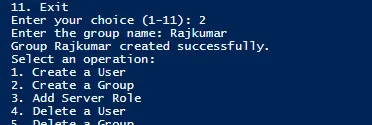 Output after creating a security group.
The other 8 operations work the same way — pick the number, enter what it asks for, and check the coloured output to confirm it worked.